This chapter contains the following topics:
Entering Job Miscellaneous Costs
Use this function to post or modify non-purchased miscellaneous costs. Purchase order invoice charges classified as Miscellaneous Costs should be entered with "Job P.O. invoices", or with the invoice entry program in Purchase Order Processing.
New entries for non-purchased miscellaneous cost charges to jobs are posted "on-line" as you complete each transaction.
Select
Job misc costs from the M/J menu.
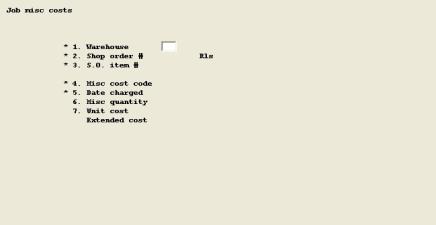
Enter the following fields:
1. Warehouse
Entry Format: Up to 2 alphanumeric characters
Default: Displays previous transaction entry, if any.
2. Shop order #
Entry Format: Up to 6 alphanumeric characters.
Validation: The combination of Shop Order Number and Warehouse must match a Job Master record on file.
Rls
Entry Format: Up to 2 numeric digits, or space, or <F1> to retrieve the next record on file for the Warehouse and Shop Order.
Validation: When adding a transaction, the combination of Shop Order Number, Release Number and Warehouse must match an open Shop Order on file.
3. S.O. item #
Entry Format: Up to 15 alphanumeric characters, or <F1> to consecutively display manufactured Item Numbers for the Shop Order Number, Release Number, and Warehouse you entered.
Validation: All of the Shop Order identification fields, including this entry, must match an open Shop Order on file.
4. Misc cost code
Entry Format: Up to 5 alphanumeric characters, or <F1> to search for the next Misc. Cost Code on file for the S.O.
Validation: Must match a Misc. Cost Code estimate record on file for the Shop Order.
If Purchase Order costs may be charged to the Misc. Cost Code, a message warns you of this condition and asks if you wish to continue entering a non-P.O. charge for the code.
5. Date charged
Entry Format: 6 numeric digits in MMDDYY format, or
<F1> to retrieve the next detail transaction already on file for the Shop Order and Misc. Cost Code.
Default: System Date displays as the default entry.
Comments: To retrieve a previously entered record, you must use <F1> at this position. This program allows entry of multiple transactions for the same Shop Order, Cost Code, and Date. If you don't use <F1>, the program assumes you are adding a record.
6. Misc qty
Entry Format: Up to 6 numeric digits plus 3 decimals.
7. Unit cost
Entry Format: <F1> to change the default displayed.
When overriding the default, you are allowed to enter up to 5 numeric digits plus 4 decimals, or press <F1> again to enter Extended Cost.
Comments: When you enter Unit Cost, the program calculates Extended Cost. When you enter Extended Cost, Unit Cost is automatically calculated.
"Before" and "After" transaction totals of Misc. Quantity and Misc. Cost are displayed for the Shop Order and Misc. Cost Code.