This chapter contains the following topics:
Introduction to Detail Plan Periods
Detail Plan Periods are the reporting time periods used for detail capacity planning displays and reports. You may define up to 60 periods, or a lesser number, of equal or varying time spans.
These plan periods only define the "time buckets" into which detail dated resource requirements and capacities are summarized on some detail plan reports and screen displays. Since actual planning detail refers to specific calendar dates, the length of defined reporting periods does not affect the amount of item lead time offset applied by the plan generation program.
Capacity Planning programs will only create information about those requirements and orders due within the schedule horizon, as defined by the End Date of the last Detail Plan period. This End Date should usually be set to correspond with the End Date in the MRP Schedule Periods used for the MRP explosions that you convert to detail capacity plans.
Detail Plan Periods for the short to medium range planning range could be set to daily or weekly time spans. You may wish to define some monthly or quarterly schedule periods for longer range planning, beyond the short to medium range horizon.
Use this program to initially define or to completely redefine your Detail Plan Periods. After Detail Plan Periods are initialized, you may use the "Shift periods" program, on the menu for "Generate detail plan", to easily drop the first period and add one new period as you start each new detail planning cycle.
There are no restrictions on how frequently you may redefine or shift periods. Capacity Planning programs use the Detail Plan Periods at the time that you run the "Generate detail plan" program to create new reports.
Select
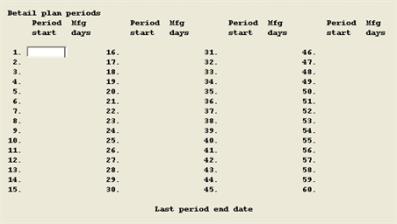
Detail plan periods from the C/P menu. The following screen displays:
If you previously entered Detail Plan Periods, they will display and the program asks "Do you wish to re-enter periods ?". If there are no previously defined periods, or you elect to re-enter all periods, you enter:
1. Period start date
6 numeric digits in MMDDYY format.
Enter the next Period Start date after which the Mfg Days for the preceding plan period will display. Mfg Days are the calculated number of manufacturing days between Period Start Dates, excluding exception days (non-working days) in the Schedule Exception Dates data.
You may enter up to 60 planning periods, or press F1 to end entering planning periods. You then are prompted to enter the Last Period End Date, after which Mfg Days are displayed for the last plan period.